Navigating the Admin Dashboard

Upon successful login, the Admin Dashboard displays options for managing your company’s CRM.
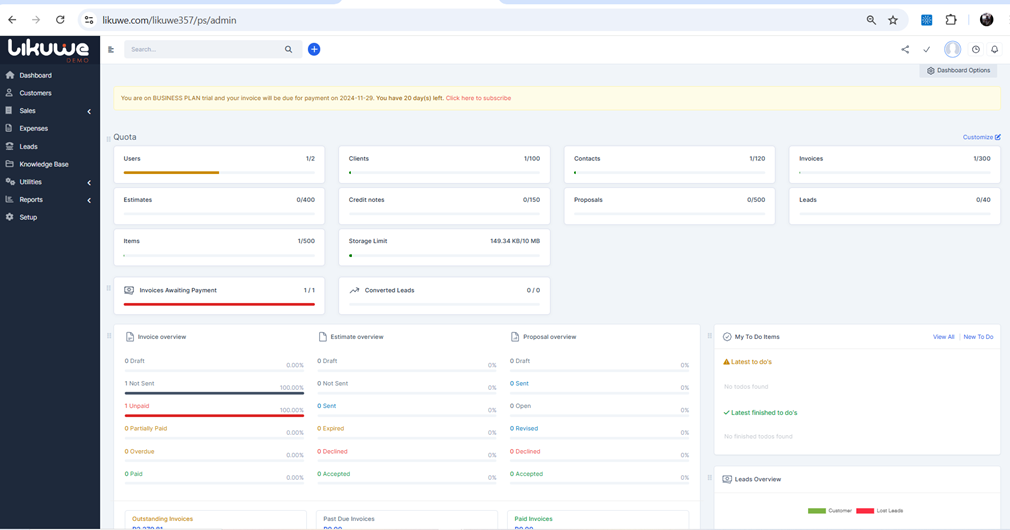
The dashboard gives you an overview of Users, Clients, Estimates, Invoices, Outstanding Invoices, Pending Tasks, Calendar and many more analytics. 

Stay close to the notification panel for urgent actions required.

Did you find this article useful?

  • Getting Started

    Select a package that aligns with your business needs and budget. Remember, you can always upgrade t...
  • Choosing a plan

    Select a package that aligns with your business needs and budget. Remember, you can always upgrade t...
  • Registering your company

    Upon choosing a plan, enter your company information to register. 1   Access the regi...
  • Welcome Email

    Check your mailbox. If you did not receive an email, remember to check the Spam or Junk mail folder....
  • Email Address Verification Email

    Check your mailbox for the Email Address Verification Email. Click on the Verify Email Address link...