Upon choosing a plan, enter your company information to register.
1 Access the registration
1. Fill in your company details and create a secure password. Remember to check the “I’m not a robot” checkbox to verify your registration.
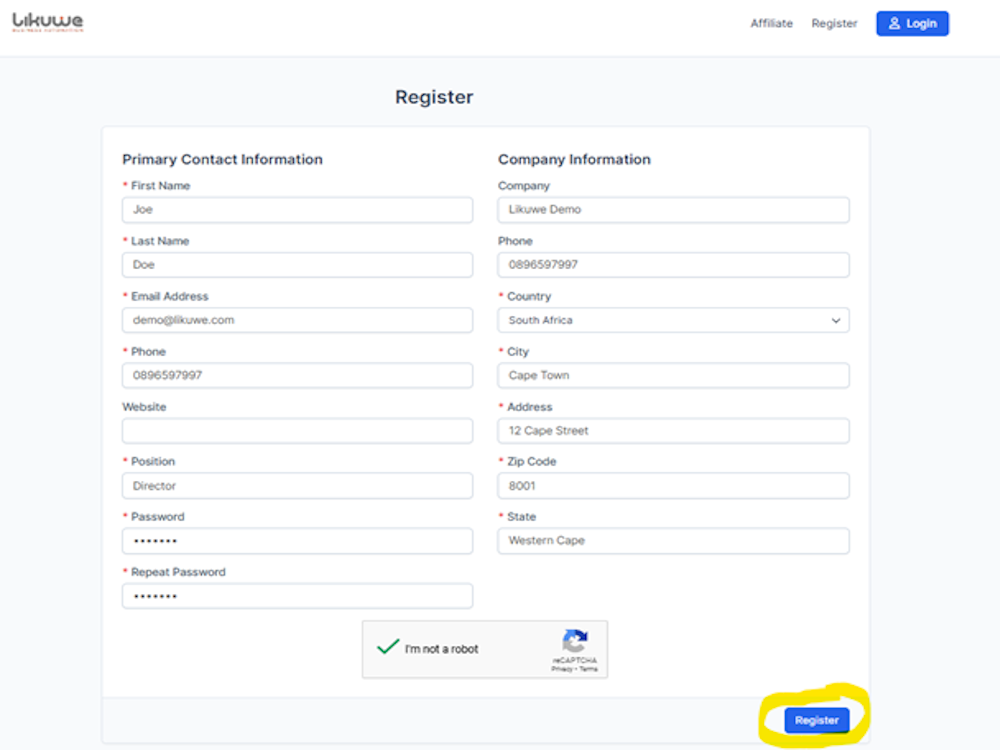
Make sure that the email address entered is correct, and you have selected the correct country. Select the "I'm not a robot".
Go ahead and click Register.
1 Saving Login information
2. Save the email address and password used during registration securely, as you’ll need these for future logins.
1 Registration Confirmation
After successful registration, check your email inbox for three essential notifications.
Do check the spam or junk mail folder in case the notifications are flagged as spam emails. If you find them move them into your Inbox to prevent future emails being blocked.
- Welcome Email: Confirms your successful registration.
- Email Address Verification Email: Verifies your email address.
- Company CRM Instance Detail Email: Provides unique links for accessing your CRM.